Tableau setup
SelectZero connects to Tableau Cloud or Tableau Server using a Personal Access Token (PAT) over the Tableau REST API.
Creating a Personal Access Token
Sign in to Tableau Cloud or Tableau Server with a user that has at least Explorer access to the projects and workbooks you want to catalog
Open My Account Settings from the user menu in the top right corner
Under Personal Access Tokens create a new token
Token name - choose a name that reflects it is used for SelectZero integration
Press Create Token and copy the generated secret immediately - it cannot be retrieved later
Note down the site name (also called content URL or site slug) from the Tableau URL
Example: in
https://10ax.online.tableau.com/#/site/yourcompany/homethe site slug isyourcompanyFor the Default site on Tableau Server the site slug is empty
Adding Tableau connection
From connections page add a new Tableau connection 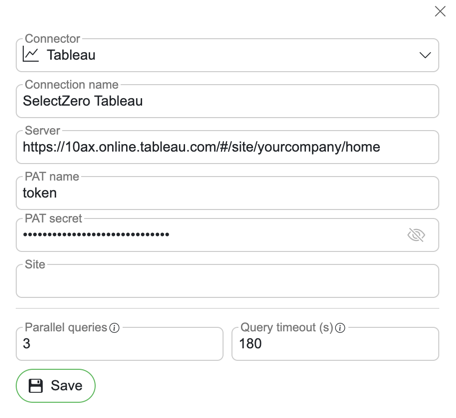
Connection name - Name for connection
Server - Tableau URL (e.g.
https://10ax.online.tableau.comfor Cloud orhttps://tableau.company.comfor Server)PAT name - Token name from previous step
PAT secret - Token secret from previous step
Site - Site slug from previous step (leave empty for the Default site on Tableau Server)
How metadata works
SelectZero calls the Tableau REST API to extract metadata and lineage from your published workbooks:
Projects are synced as schema-level objects
Workbooks are synced as tables under their project
Worksheets and their fields are extracted as columns, parsed from the workbook XML
Lineage is automatically built by matching each worksheet's data source to existing SelectZero database connections. The matching is done by database server URL, database name, schema, and table - when a workbook references a server and table that match an existing SelectZero connection, lineage is established automatically. Custom SQL relations are captured as the worksheet's source query