
SelectZero 2026.10 automates more of your everyday data quality work. Scheduled automations now keep catalog metadata and test coverage up to date for you. You can ask about your catalog, data quality or lineage in plain language. File-based sources get a new, much more capable SQL engine. Comparison tests scale far beyond what they could before.
Automations that keep metadata and test coverage up to date
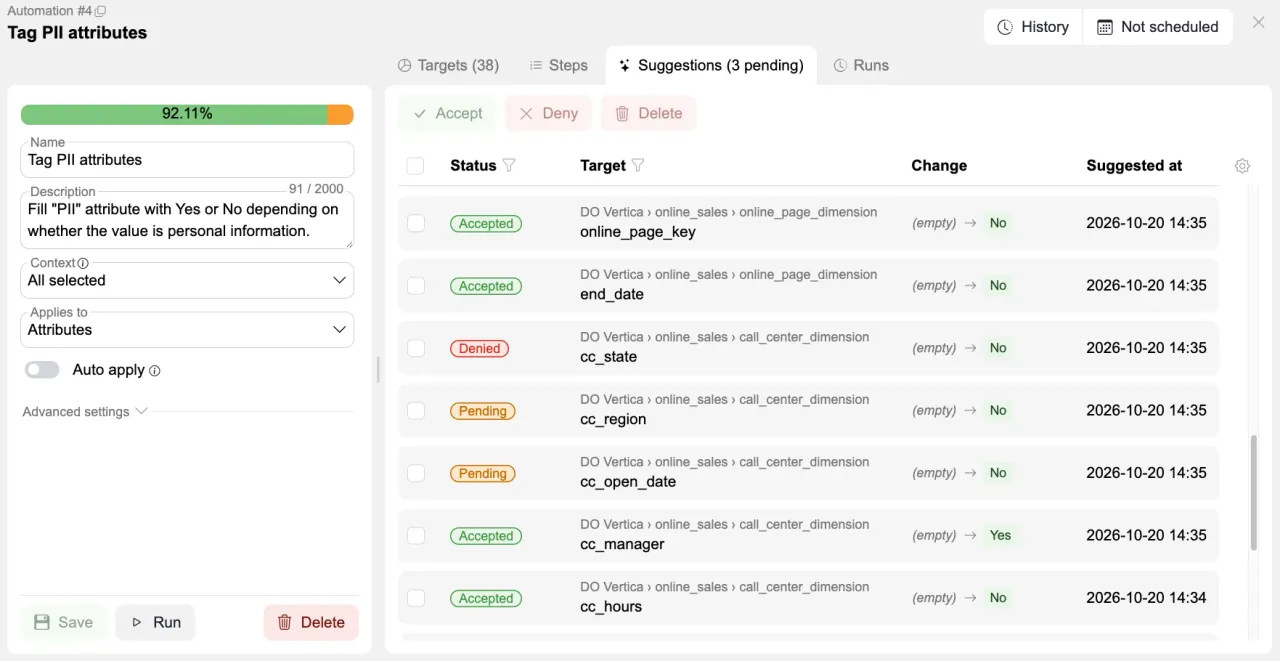
Think of it as an AI data steward for your catalog. Scheduled automations fill in and review metadata such as PII flags and descriptions, and check that key columns are covered by test cases. Unless you switch on auto apply, nothing changes without you: every proposal lands in a suggestions queue where you accept or reject it.
Ask AI about your catalog, data quality and lineage
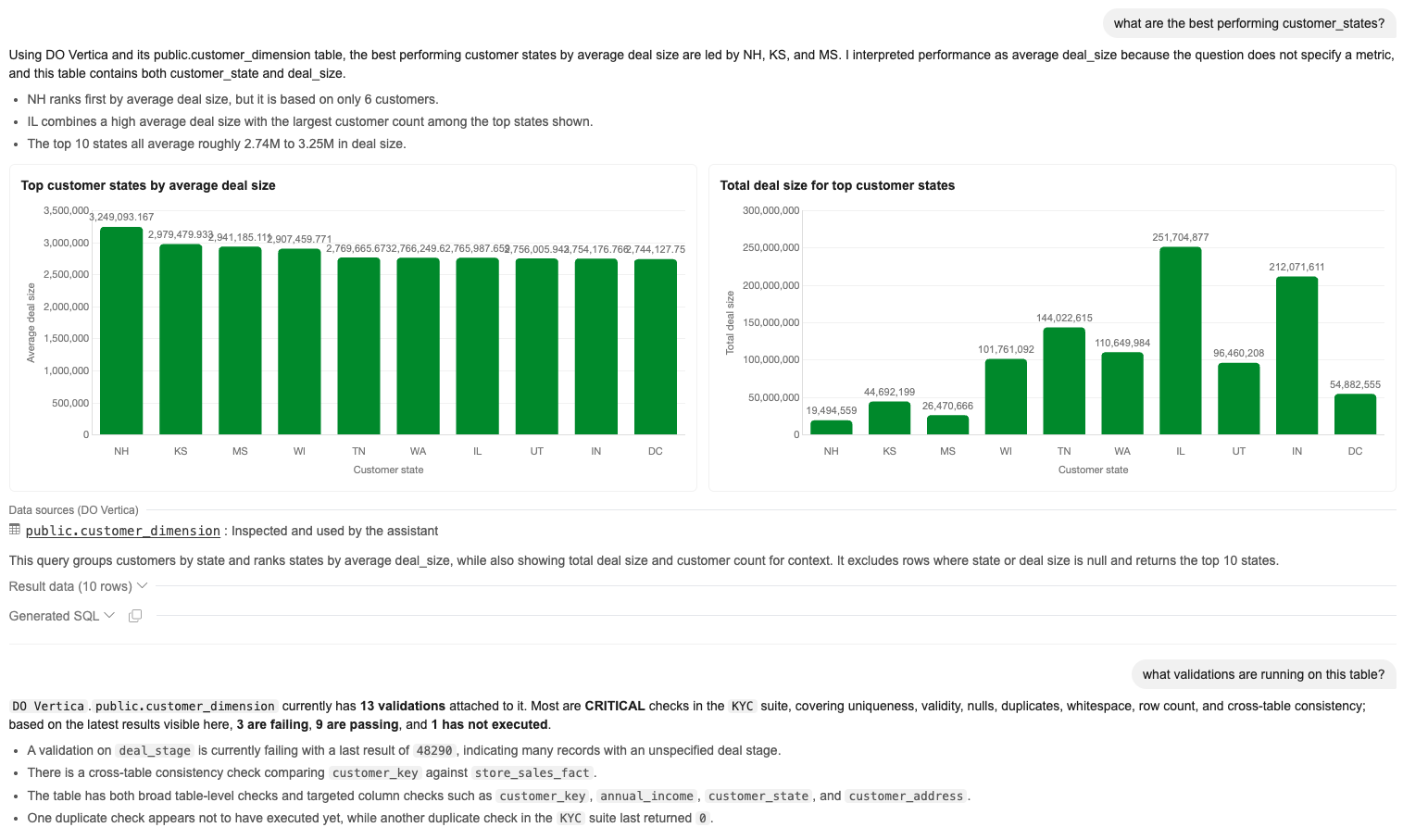
Ask AI answers plain-language questions about your catalog, data quality and lineage. Ask which validations cover a table and which of them are failing, how an object is connected through lineage, or which columns are tagged as PII. Answers draw on the catalog, glossary, lineage and test results, and list their evidence as tables that open the validations, objects and glossary terms behind them. Lineage can even be shown as the interactive graph, right in the chat.
Simple business questions get quick answers too. Ask for your best-performing regions or a monthly trend, and Ask AI runs a read-only query against the source and replies with a chart, the result rows and the SQL it ran, so every number can be checked. Follow-ups such as “now only 2024” refine the same answer.
Derived custom fields along datasets, glossary and lineage
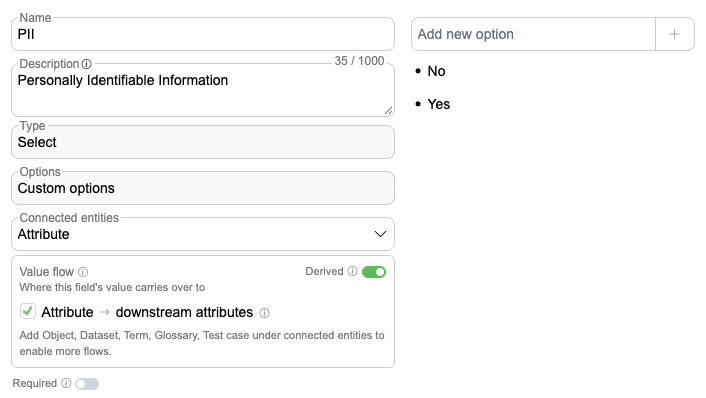
Set a custom field value once and it carries over to everything connected to it. Mark a dataset as PII and the value also shows on its objects, their attributes and the attributes downstream of them in lineage. It reaches test cases too: a test case takes the values of the attribute it checks, the object it runs on and the business rule it implements, so validations are classified like the data they test. Glossary values flow to their terms the same way.
Derived values work in custom field filters, dashboard tiles and scheduled test case reports. Nothing is copied, so a change at the source shows everywhere at once, and a value set directly on an entity always wins. Value flow is switched on per field, and custom fields also get descriptions.
Profiling flags never-seen-before values
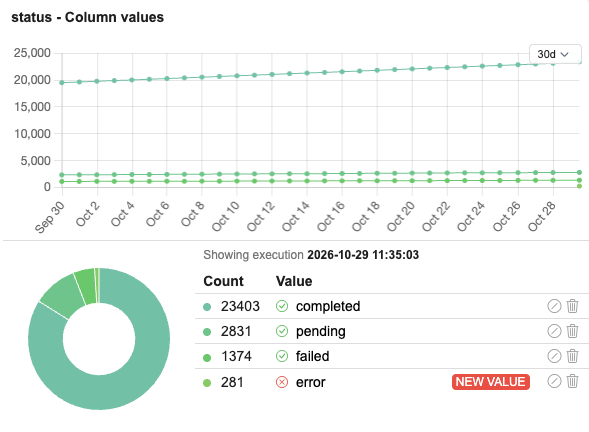
The column value rule now flags values that have never been seen before. Profiling objects can be duplicated and exported or imported together with their rules, and date filters can look ahead to profile future-dated rows.
A full SQL engine for files and APIs
CSV, Excel, SharePoint and REST sources can now be queried with complete SQL. SharePoint connections read whole folder trees, REST responses are flattened into tables automatically, and Excel dates come through correctly.
Comparison tests at a much larger scale
Comparisons now run in an embedded engine instead of application memory, so much larger datasets can be compared. Numeric values compare by value, which means 10 and 10.00 match.
Object-based data quality alerts and other alert improvements
Subscribe to a catalog object or business rule and get notified when its data quality falls, with the failing checks listed. Webhooks can now include the failing rows, and standalone test cases can attach Excel reports to their alerts.
REST API for the catalog, glossary and business rules
The REST API now covers catalog objects, attributes, glossary terms and business rules. The JSON import API also gets a safe create, update and delete flow for test suites and business rules.
Helm chart, stateless deployment and AWS support
SelectZero now has a published Helm chart and a stateless deployment option backed by S3. Credentials can also be referenced from AWS Secrets Manager. A JSON log file feeds your log collectors, and personal data stays out of standard output.
Other changes
- Business rules get change history, mass actions, and one-click creation of an empty linked test case
- dbt tags and meta fields map to SelectZero custom fields, and dbt syncs are considerably faster
- Separate delete privileges, so a role can edit without being able to delete
- Admins can set the default visible columns of every table for all users
- Each test run links to the version of the test case that ran
- Dynamic test templates can generate one test case per selected column
- Selected test cases can store more than 10,000 result rows
- A separate retention setting for sample data, including on demand only
- Import previews explain row by row why an entry cannot be imported
- Alerts on whole glossaries, with alert recipients included in imports and exports
- Lineage Excel export includes all relations, not only direct ones
- BigQuery metadata sync loads foreign keys and view lineage
- Schema sync explains why it failed, and very large schemas delete quickly
- Faster dashboards and catalog object lists on large catalogs
Before you upgrade: file sources move to DuckDB
CSV, Excel, SharePoint and REST connections now run on DuckDB. It supports full SQL with joins, CTEs and window functions, and it is much faster. It is also stricter than the previous engine, so a few things are worth knowing.
- Excel, SharePoint and REST connections switch to the new engine automatically on upgrade.
- Existing CSV connections stay on the previous engine until you switch them in the connection settings. New CSV connections use the new engine.
- Text columns that contain only numbers now load as numbers, and placeholders such as
N/Aread as empty. Columns with other text stay text, so numeric comparisons on them need an explicit cast such asTRY_CAST(price AS DOUBLE). - Test SQL on Excel and SharePoint connections must be read only, and CSV files read by the new engine must be UTF-8 encoded.
- The new engine uses memory outside the Java heap. If you set the heap yourself with
-XmxorMaxRAMPercentage, give it about half of the server’s memory and leave the rest for the engine. See Memory sizing.
We recommend running your file-based test suites once after upgrading and reviewing any new failures. Column typing can be tuned under Settings › General › Text column type promotion.