
SelectZero now ingests metadata from both dbt Core and dbt Cloud. Your dbt models, sources, seeds, snapshots, tests, and lineage flow into the SelectZero catalog and merge with metadata from every other system you connect – your BI tools, ETL jobs, operational databases, and warehouses. dbt teams get a single place to see how their models are actually used downstream. Data teams outside dbt get visibility into what dbt is doing upstream. Everyone gets one catalog, one lineage graph, one source of truth.
The problem dbt users keep running into
dbt is excellent at what it does. You version your transformations, test them, document them, and ship them with confidence. The dbt docs site gives you a clean view of your project: models, sources, tests, lineage between them.
But your dbt project is not the whole picture. It is a slice in the middle.
Upstream, data arrives from operational databases, SaaS systems, files, message queues, and CDC pipelines. Downstream, your models feed dashboards, reports, reverse-ETL jobs, ML pipelines, and exports to other teams. dbt sees the part it owns. It does not see where the source tables actually come from, and it does not see where the marts actually end up.
This creates familiar pain:
- An analyst changes a column in a core model and breaks a Power BI report nobody linked to the dbt project.
- A platform team deprecates a source table without realising six dbt models depend on it.
- Compliance asks “where does this PII column end up” and dbt docs can answer for the warehouse but not for the BI layer or the export jobs.
- New engineers spend weeks learning which dbt models are actually important versus abandoned.
dbt docs solve the in-project problem. SelectZero solves the cross-system problem.
What the integration actually does
SelectZero connects to your dbt project and ingests the standard dbt artifacts: manifest.json, run_results.json, and catalog.json. For dbt Cloud, we pull these from the Cloud Admin API and enrich them with metadata from the Discovery (GraphQL) API, using a service token. For dbt Core, we read the same three artifacts from S3 or any S3-compatible object store – point your CI job at a bucket and we’ll pick them up from there.
From those artifacts we extract:
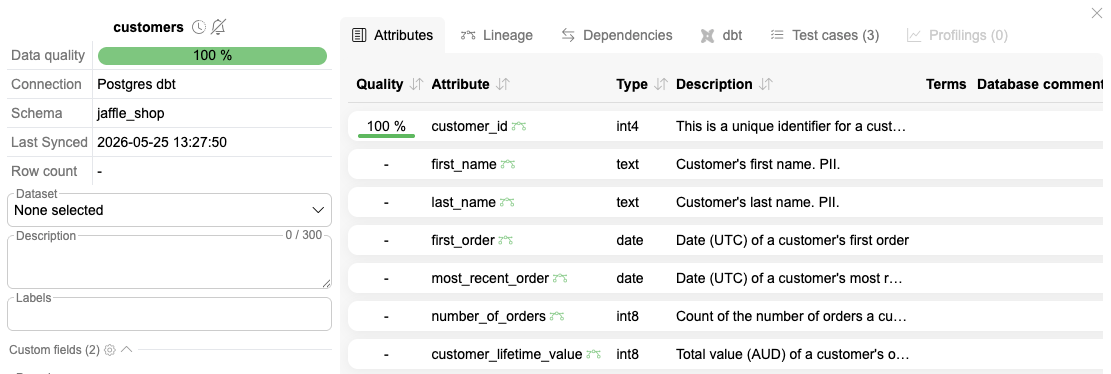
- Models, sources, seeds, and snapshots as first-class catalog objects, tagged with their dbt project, schema, and materialization.
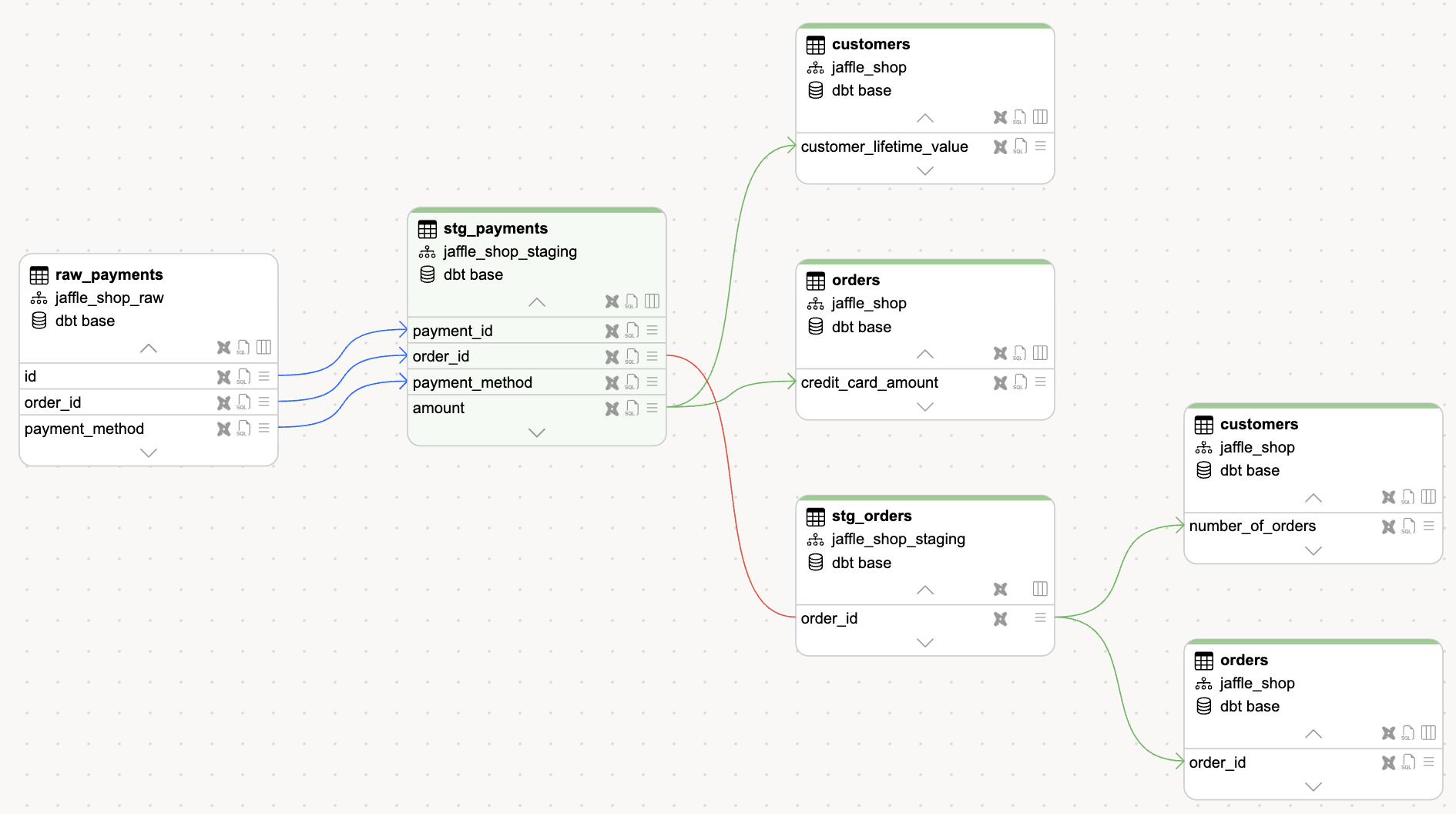
- Column-level lineage linking each dbt model to the warehouse table it materialises and through to its upstream sources and downstream consumers, so a column in a mart connects back through staging to the raw source it came from.
- Tests registered as SelectZero test cases, with the latest pass/fail outcomes pulled from run_results.json so dbt test history shows up next to the rest of your data-quality runs.
- Source freshness captured from the manifest and attached to the source.
- Descriptions, tags, and meta fields from your schema.yml files (merged with column comments from catalog.json), so the documentation you already wrote shows up in the catalog without duplication.
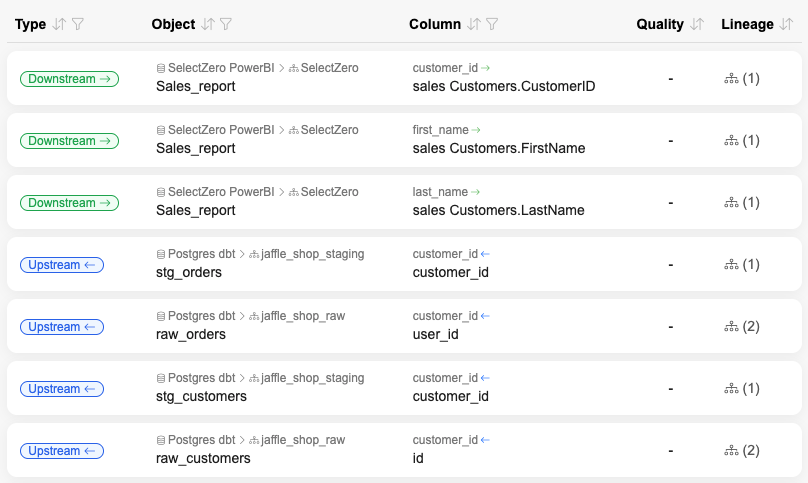
The result is that every dbt object appears in the SelectZero catalog with a dbt badge, and its lineage connects on both sides: backwards into the warehouse tables and operational sources that feed it, forwards into the BI dashboards, reports, and downstream consumers that depend on it.
The built-in dbt Explorer
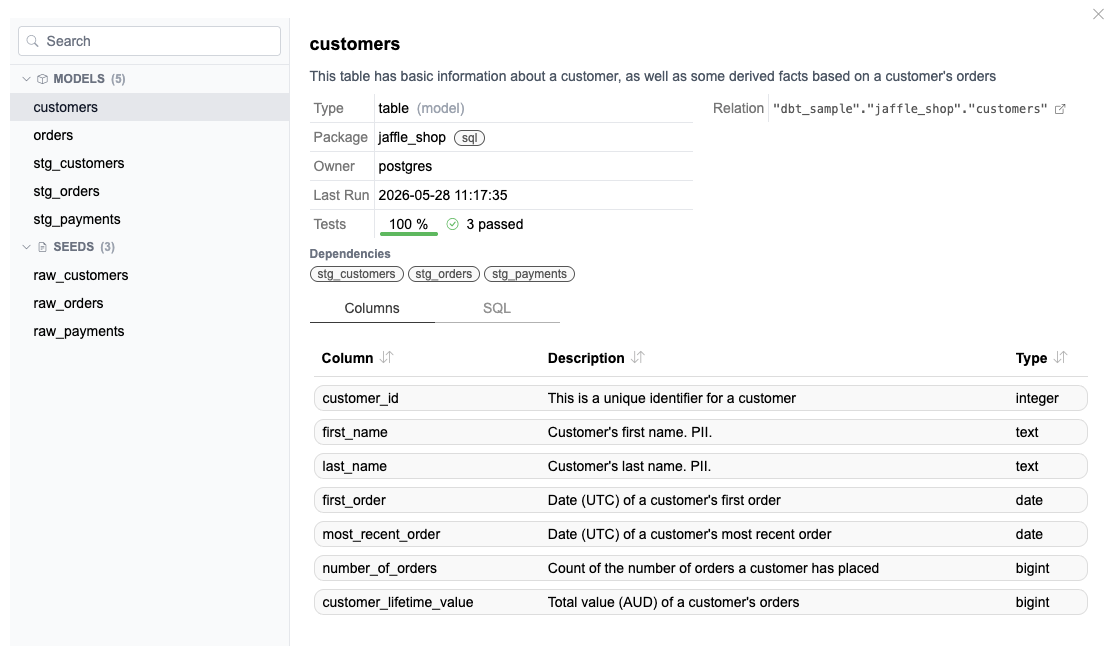
Alongside the unified catalog view, SelectZero ships a dedicated dbt explorer: a tree of every model, source, seed, snapshot, and test in your project, grouped by type, with a detail panel that shows columns, dependencies, the compiled metadata, and the latest run status for whatever you click. If your team already lives in dbt docs, the explorer gives them something they recognise – but with everything else SelectZero knows about that object one click away.
Concrete value by audience
For dbt developers
You stop guessing at downstream impact. Before you change a model, you can see every Power BI report, Tableau dashboard, Looker explore, reverse-ETL sync, and ad-hoc consumer that touches the columns you are about to modify. dbt’s –defer and state comparison tell you what changed inside the project. SelectZero tells you who outside the project will feel it.
You also get a public surface for your work. The descriptions and tests you write in schema.yml are visible to business users who would never open a dbt docs site – they search the catalog, find your model, and trust it because the tests next to it are green.
For data platform and governance teams
dbt becomes a transparent part of the estate instead of a black box that produces tables. You can answer “where does customer email show up” in one query, across operational DBs, dbt models, marts, BI tools, and exports. PII tags follow dbt lineage automatically. Access reviews, retention policies, and data contracts apply uniformly whether a column lives in a source table, a dbt staging model, or a downstream report.
For BI and analyst teams
When a dashboard breaks or a number looks wrong, you trace it backwards through SelectZero’s lineage into the exact dbt model and the exact source table, with the latest test results and freshness right there. No more “ask the dbt team” tickets to find out why a metric shifted.
For leadership and compliance
One catalog covers the whole estate. Audit questions about data flow, ownership, and quality get answered from a single system instead of stitched together from dbt docs, warehouse metadata, BI tool catalogs, and tribal knowledge.
dbt test results land where the rest of your DQ lives
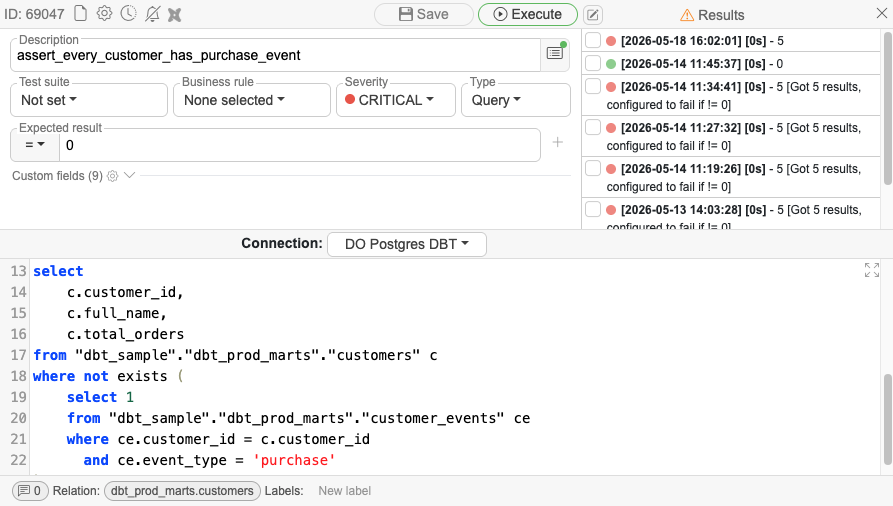
Every dbt test we find in the manifest is registered as a SelectZero test case against the column or model it covers. Each time we sync run_results.json we attach the latest outcomes as test-case executions, so dbt tests live in the same execution history as every other SelectZero check. Failed runs and stale models surface immediately in the catalog, not after someone notices a broken dashboard.
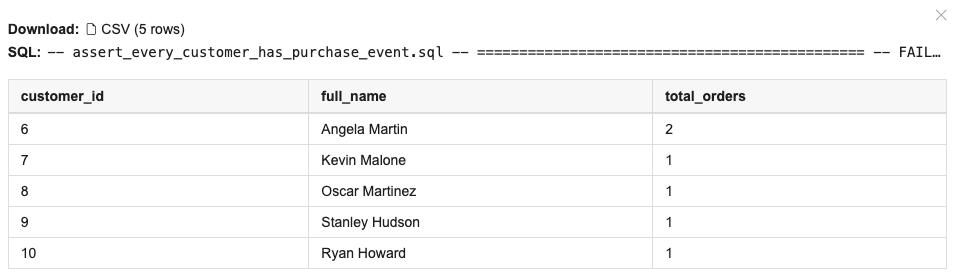
Row-level issues are immediately available to users with the right privileges.
dbt Core and dbt Cloud, same experience
We support both.
- dbt Cloud users provide an account ID and a service token. SelectZero pulls artifacts from the Admin API and enriches the model graph through the Discovery (GraphQL) API. Access and Discovery URLs are configurable, so regional dbt Cloud instances work out of the box.
- dbt Core users point us at an S3 or S3-compatible bucket (with an endpoint override for MinIO, R2, GCS-with-HMAC, etc.) where your CI uploads manifest.json, run_results.json, and catalog.json. No agent, no local file path, no extra service to host.
The catalog experience is identical from there. If you run a mixed setup – multiple dbt projects across Core and Cloud – they all land in the same SelectZero catalog and lineage graph.
Getting started
- Add your dbt project in Settings → dbt. Pick dbt Cloud (account ID + service token) or Artifacts (S3 bucket + credentials), and link the warehouse connection it builds against.
- Connect at least one upstream source (your warehouse or operational DB) and one downstream consumer (BI tool, reverse-ETL, or export job). The value of cross-system lineage scales with what is connected.
- Open the catalog or the dbt explorer. Your dbt models are there, with tests, freshness, descriptions, and full upstream/downstream lineage.
That is the whole setup. No changes to your dbt project, no new YAML, no required tags or conventions. SelectZero reads what dbt already produces.
Closing
dbt gave the industry a great pattern for transformation. SelectZero extends that pattern across the rest of the estate. For teams running dbt who care what happens to data before it arrives and after it leaves, the integration is built for exactly that.

Release 2026.8
SelectZero release 2026.8 SelectZero 2026.8 is centred on access control and lineage. Roles now behave the way regulated environments expect them to, with visibility scoped down to the individual database and schema, [...]
Release 2026.7
SelectZero release 2026.7 SelectZero 2026.7 is one of the broadest releases so far, reaching nearly every part of the platform. The interface has been rebuilt end to end, and profiling takes a [...]

Unified data quality, catalog, and lineage: why G2 ranks SelectZero a High Performer
Most organizations don't have a data quality problem in just one system, they have one spread across ten different databases, dashboards, and pipelines that nobody fully understands anymore. SelectZero exists to close that gap: [...]
Did that fix actually work? Track row-level differences for data quality checks
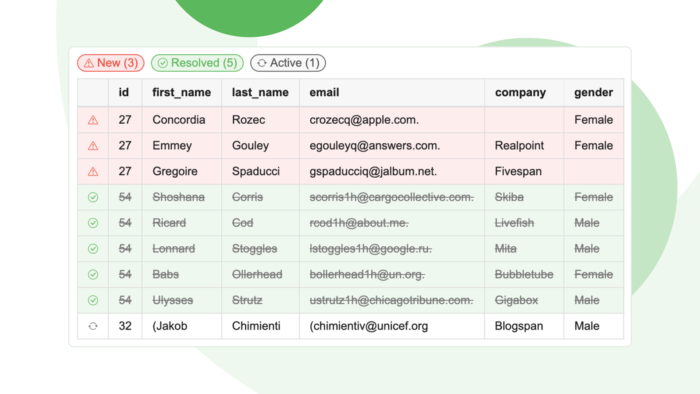
When you monitor data quality, finding out that something is wrong is only the beginning. The harder question is what is wrong. Is this a brand-new problem that appeared overnight or a recurring issue [...]
SelectZero now integrates with dbt
SelectZero now ingests metadata from both dbt Core and dbt Cloud. Your dbt models, sources, seeds, snapshots, tests, and lineage flow into the SelectZero catalog and merge with metadata from every other system you [...]
Your catalog, in any AI client: SelectZero MCP server
SelectZero now ships a built-in Model Context Protocol (MCP) server. Point Claude Desktop, Cursor, Claude Code, VS Code, or any other MCP-aware client at your SelectZero instance, and your AI assistant gets first-class access [...]