
Your catalog, in any AI client: SelectZero MCP server
Published On:
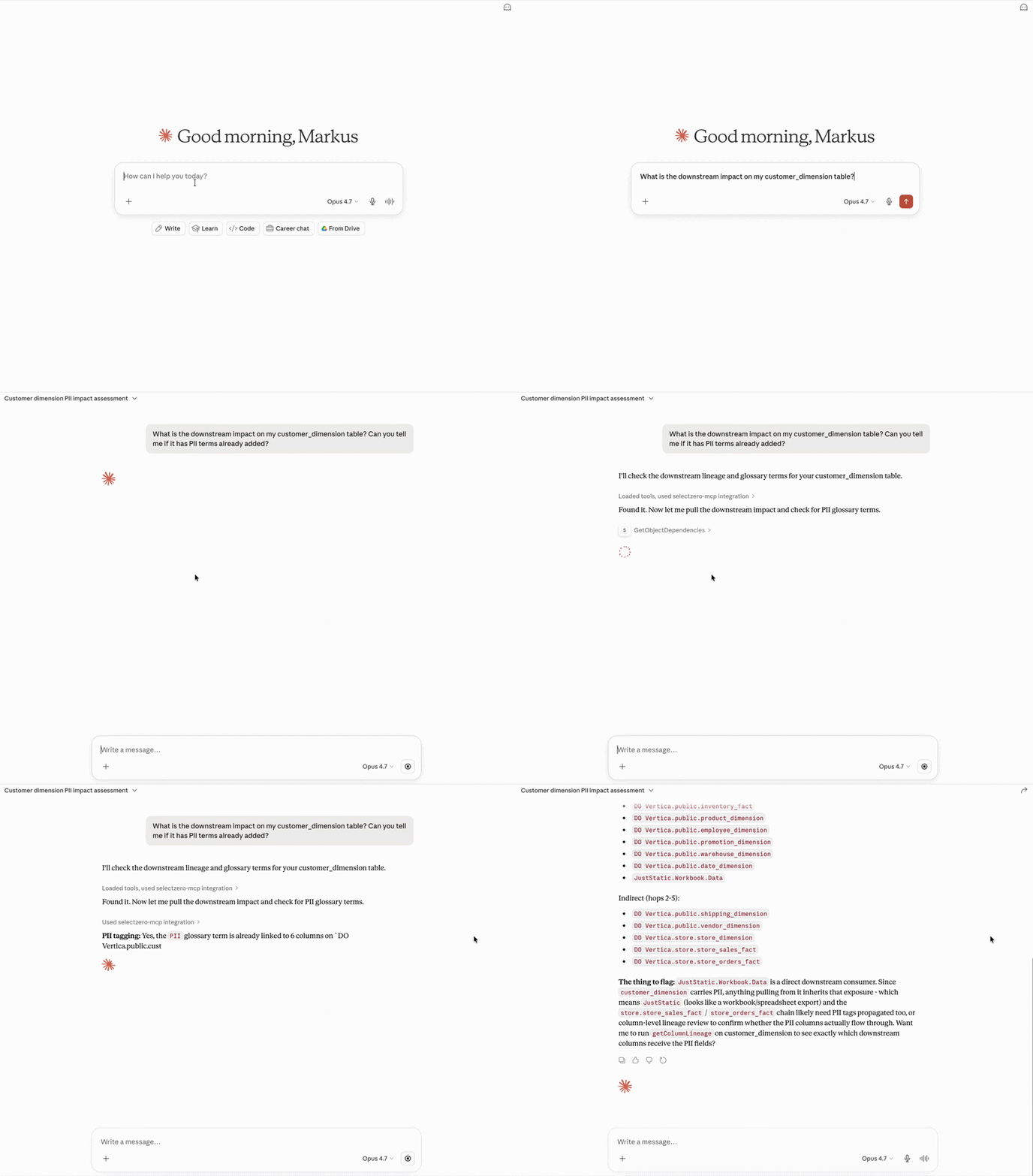
SelectZero now ships a built-in Model Context Protocol (MCP) server. Point Claude Desktop, Cursor, Claude Code, VS Code, or any other MCP-aware client at your SelectZero instance, and your AI assistant gets first-class access to your catalog, glossary, lineage, tests, and audit history – scoped to whatever the user behind the token is allowed to see. Twelve read-only tools and three guided “recipes” mean an analyst, engineer, or steward can have a conversation with their data stack instead of clicking through screens.
The problem
Every team is now running AI clients next to their work. Engineers live in Cursor and Claude Code. Analysts open Claude Desktop. PMs paste schemas into ChatGPT. The pattern is the same everywhere: ask a question, hope the model has enough context.
The catch is that none of these clients know anything about your data estate. They cannot tell the engineer that the column they are about to drop feeds three Power BI dashboards. They cannot tell the analyst that “customer_email” is tagged as PII and lives in eleven tables. They cannot tell the on-call engineer that the failing test was added two weeks ago by someone who has since left the company.
You end up either:
- Pasting fragments of context into prompts and hoping for the best.
- Asking the AI questions it has no way to answer, and getting confident-sounding fabrications back.
- Switching out of your AI client into a separate catalog UI, doing the lookup by hand, switching back. The exact manual work the AI was supposed to eliminate.
MCP fixes this. SelectZero now speaks it.
What the integration actually does
SelectZero embeds an MCP server directly in the Spring Boot backend. It is exposed over streamable HTTP at /api/v1/mcp, switched on from the settings page, and authenticated with Personal Access Tokens (PATs) – user-bound tokens each person generates in their own profile.
A PAT carries the user’s role. Every MCP tool call runs through the same privilege and per-connection access checks as the rest of SelectZero – if a user cannot see a connection in the UI, the MCP server will not return its objects, columns, lineage, or test cases either. The same license tier rules apply. There is no separate permissions surface to keep in sync.
The server exposes twelve read-only tools, grouped into three areas:
Catalog and metadata
- searchCatalogObjects – filtered, paginated search across tables and views, with column counts, row counts, test coverage, profiling status, and any custom fields you have configured.
- getCatalogColumns – column-level drilldown: data types, nullability, PK status, null percentage, unique count, linked glossary terms, per-column custom fields.
- getColumnLineage – one-hop column-level upstream/downstream, across connections.
- getObjectDependencies – multi-hop object lineage (1–10 hops), with direction and relation type, deduplicated to object level so downstream analysis stays readable.
- searchGlossaryTerms – search the business glossary by name or description; returns term hierarchy, linked columns, and custom field values.
- discoverCustomFields – list every custom field configured in SelectZero, by entity type, with allowed option values inline. Let the AI client adapt to your taxonomy on the fly.
Quality and audit
- searchTestCases – find data-quality checks by description, connection, target object, suite, severity, or custom field.
- getExecutionHistory – execution timeline for a specific test case, with date range and status filters.
- getAuditHistory – version history for any entity (catalog object, term, test case, column) – what changed, who changed it, when.
- getAuditSnapshot – the full JSON state of an entity at a specific audit event, so the AI can diff versions for you.
Suggestions
- suggestProfiling – deterministic, rule-based profiling suggestions derived from existing profiling history (uniqueness, value sets, patterns, bounds).
- suggestTestCases – AI-backed test suggestions, optionally scoped to columns plus a free-text hint. This is the one tool that calls out to your configured LLM (OpenAI, Azure, or Ollama) – it composes the prompt from real column schema, optional profiling examples, and optional glossary terms, and returns structured test-case suggestions. Off by default; turn it on per deployment.
Every tool is read-only. The MCP server cannot create, edit, or delete anything in SelectZero. Mutations stay in the UI and the REST API where they get the full audit treatment.
Recipes: guiding less-capable clients through multi-step workflows
Calling one tool is easy. The interesting questions need three or four tools chained together – and not every AI client is great at deciding which to call next. SelectZero ships three curated recipes, exposed as MCP Resources that any client can pull on demand:
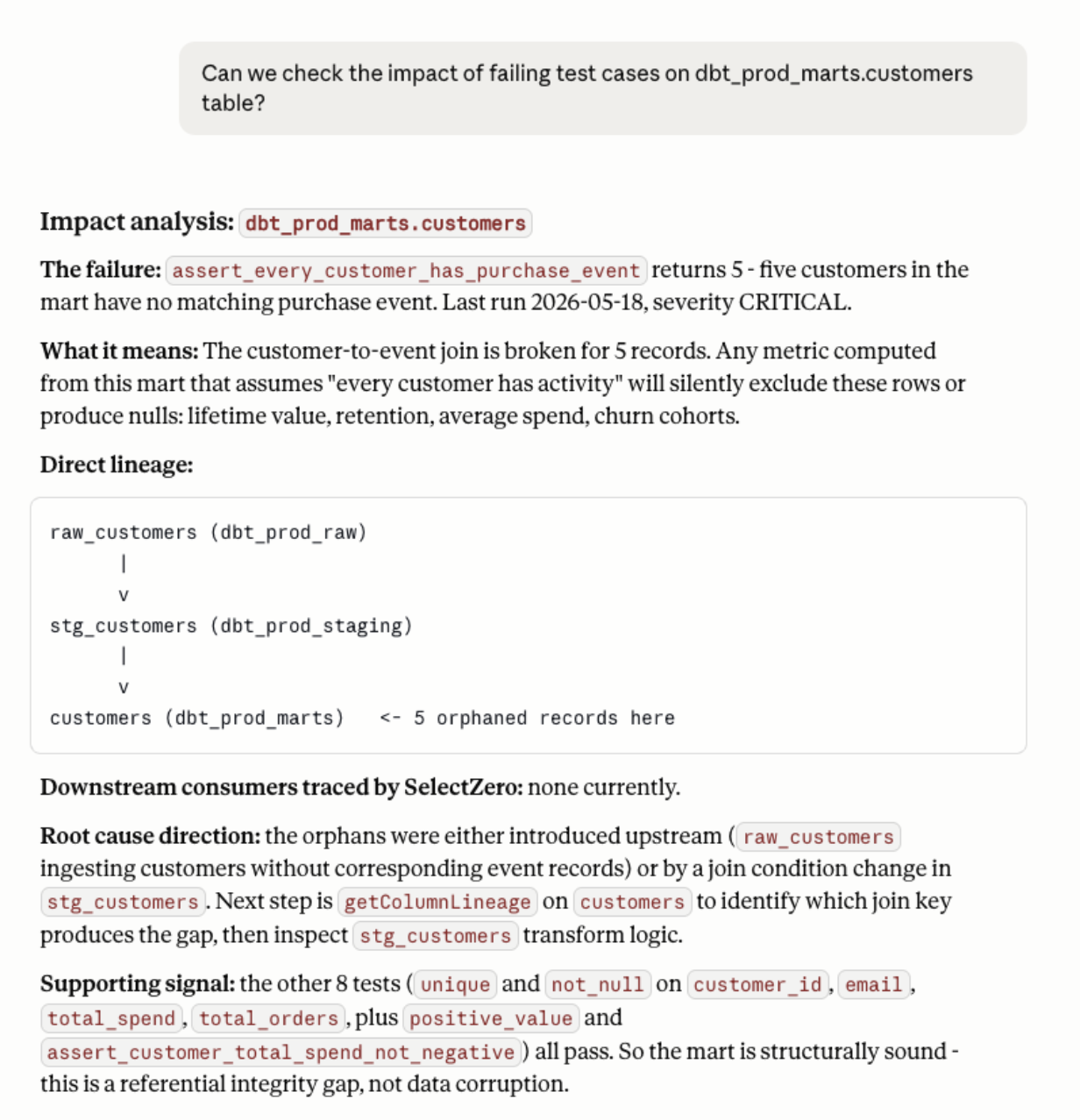
- Root-cause analysis – start from a failing test, walk through execution history, audit history, audit snapshots, and upstream dependencies to find the change that broke things.
- Coverage gaps – discover custom fields, find catalog objects in a given domain, identify which have no tests, and propose profiling for the gaps.
- Impact analysis – given an object, find its downstream dependencies and surface the tests on each, so you know what to verify before a change.
These are not hardcoded workflows. They are markdown documents the AI reads, decides whether to apply, and adapts to your specific question. Think of them as institutional memory for how SelectZero is best used, shipped alongside the tools themselves.
Concrete use cases
Engineer about to change a column (in Cursor or Claude Code)
“I’m about to rename customer.email to customer.email_address in the orders schema. What breaks?”
The agent calls searchCatalogObjects to locate the table, getColumnLineage to find downstream columns, getObjectDependencies for the dashboards and reports that read from it, and searchTestCases for the checks it would invalidate. You get a precise impact summary in your IDE without leaving your IDE.
Analyst chasing a number (in Claude Desktop)
“The weekly revenue dashboard dropped 12% – start with mart_revenue_weekly and tell me what changed in the last seven days.”
The agent walks the root-cause recipe: latest run on tests covering that table, audit history on the model, audit snapshots to diff the SQL, upstream lineage to find a source that started returning fewer rows. End-to-end investigation, conversational.
Data steward auditing coverage
“List every table in the customer_360 domain that has no critical test, and propose what to add.”
The agent uses discoverCustomFields to find the domain field, searchCatalogObjects to filter, searchTestCases to identify gaps, and suggestProfiling (or suggestTestCases if copilot is enabled) to propose checks. A coverage audit that used to be a multi-day task becomes an afternoon.
Compliance and governance
“Show every column tagged PII across our warehouses, who owns each table, and whether each has an active test.”
discoverCustomFields → searchCatalogObjects filtered by PII tag → getCatalogColumns per match → searchTestCases per object. A single conversation produces an evidence pack instead of a multi-day spreadsheet exercise.
New team member onboarding
“Tell me everything you know about the orders table – columns, glossary terms, upstream sources, downstream consumers, current tests, recent changes.”
One question, six tools, a complete picture. The conversation transcript itself becomes onboarding documentation.
On-call during an incident
“Tests on fct_payments started failing 40 minutes ago. Walk it back.”
getExecutionHistory for the failures, getAuditHistory on the table and its upstream dbt model, getAuditSnapshot to diff the change, getObjectDependencies to scope the blast radius. The investigation runs at conversation speed.
Setup
- In Settings → General → Modules, toggle the MCP server on. If you want AI-backed test suggestions (suggestTestCases), enable the Copilot MCP toggle as well – it requires Copilot to be configured under AI settings.
- Have each user generate a Personal Access Token in their profile.
- Point your MCP client at https://
/api/v1/mcp with the PAT in the auth header.
That is the whole setup on our side. Whatever your AI client of choice – Claude Desktop, Claude Code, Cursor, VS Code, any MCP-aware tool – will pick up the twelve tools and three recipes automatically and start using them.
What is not in scope yet
- Read-only. Creating a test case, editing a glossary term, or tagging a column still happens in the UI. Write functionality is a future roadmap item; we want the read surface to be rock-solid first.
- No streaming tool calls. Synchronous request/response; long-running operations are not exposed yet.
- Per-tool audit logging is not separately recorded. Permissions are enforced at every call, but the existing audit log captures mutations only.
Closing
MCP turns your data catalog from a place people visit into a service every AI client can use. SelectZero already has the metadata, lineage, tests, glossary, and history – the MCP server just makes all of it available to the assistant your team is already talking to.
If your engineers, analysts, and stewards are spending half their day in an AI client, they should be talking to your catalog, not around it.
Documentation – https://selectzero.com/docs/mcp-setup.html